3. SCURTY Architecture
SCURTY can be viewed as a black box that governs database security. Security requirements are provided to SCURTY via the PL/SQL API. A few seconds after providing them, they are put into effect, e.g. a user is created or a grant is provided. All parts of SCURTY are completely run as SQL (e.g. views) or PL/SQL inside the Oracle Database. At runtime there is no code, configuration file or anything else in use on operating system level. Configuration files are only used during installation. The installation process creates and populates the SCURTY owner schema. This schema is named “SCURTY” by default but the name may be chosen during installation (see SCURTY Installation Guide for details). It is locked after installation and should never be opened. The schema owns all SCURTY objects including tables, views, packages, procedures, triggers and jobs used by SCURTY. Some objects as the API packages, configuration tables or informational views are there to be used by administrators or departmental users while others are for internal use by SCURTY only.
API calls sent to SCURTY get picked up by SCURTY processes (database procedures) that create, alter or drop the required definitions inside SCURTY (e.g. object group definitions) and in the database (e.g. database roles). If database role changes are necessary to fulfill a requirement, the end user has to login after that change be affected by the change. All other changes take effect immediately.
Refresh processes of SCURTY are responsible to set definitions into operation and to sychronize the Oracle Database dictionary with the SCURTY definitions. This synchronization takes place only seconds after a change has been made and it works in both directions. If a change is made through the SCURTY API the database dictionary gets informed about this change. If a change is made by a database user outside the scope of SCURTY, e.g. a DBA directly grants access on SCURTY protected objects, this change is reflected within SCURTY and possibly reverted if the implemented security rules require to do so. In this case, the SCURTY refresh takes place at after the scheduled time period, which is set to 60 minutes by default. Another example is if the DBA drops a user then the configuration belonging to this user is removed from SCURTY.
All calls to the API and the resulting changes in meta data defnitions are logged to table LOG_MESSAGES. This is also true for internal calls that are for example triggered by the refresh processes. The retention period of table LOG_MESSAGES can be configured using procedure P_REP_ADMIN.SET_PARAM.
3.1. Illustration of the SCURTY archtecture
To provide an overview, the figure below shows an example of how SCURTY works. The purple user in the example calls the SCURTY API and grants different access privileges on rows and columns to users orange and blue. After that the two users send the same SQL statement to the database but get different result sets: blue user gets 6 records with the job-IDs “AD_PRES” and “IT_PROG” and the salary column is populated for a subset of these records. The orange user gets 11 records for different job-IDs with some other salary values populated. Different grants on rows and columns result in different data returned to the users:
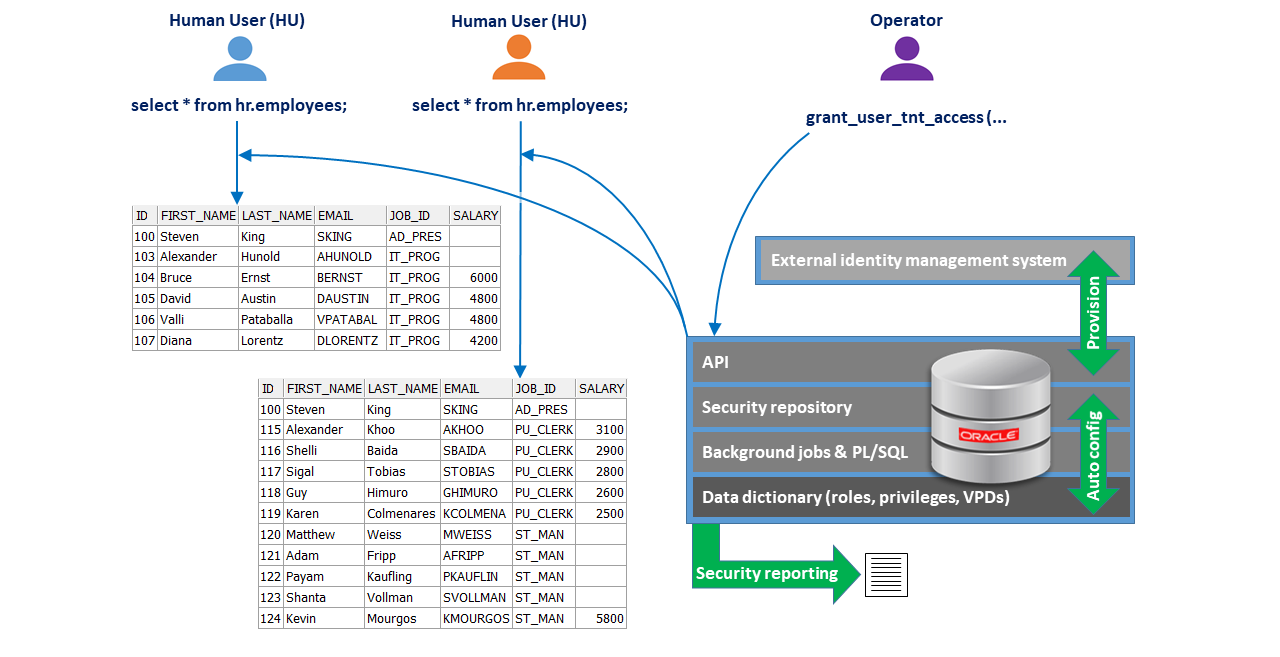
Fig. 3.1 SCURTY architecture
3.2. User types
There are four types of users within SCURTY:
A “Human User” (HU) is a physical user sitting in front of a screen
A “Generic User” (GU) is an application user or batch user for external processes
A “Technical User” (TU) is a three-tier application server user
A “Sandbox Owner” (SBX) owns a schema that may be shared between users
If a database user is not classified as either HU, GU, TU or SBX then this user is called an “unclassified user”. The first three user types (HU, GU and TU) are described below, SBX is described in paragraph Access to project sandboxes.
3.2.1. Human Users (HU)
Human users are bound to a physical person. Access to the database is provided through these strictly personalized accounts. All grants are provided to them. This enables personalized security enforcement and meaningful audit logs.
If a human user owns quota on the schema associated with the account, this schema may be used as a private sandbox. Grants on this schema cannot be provided to other users and it is not possible to create object groups on the objects in this schema (this restriction is technically enforced by SCURTY).
3.2.2. Generic Users (GU)
These accounts are not bound to a physical person. They may only be used by batch-processes, external calculation engines, etc. that require them.
In addition, human users may get the privilege to use all objects of the generic user. The database is still aware of the identity of the human user while the generic user’s objects are accessed. Row- and column level security may be switched from the human user’s view to that of the GU user (see below).
Generic users cannot become sandbox masters.
Object groups may be created on objects in a GU’s schema (this is different to human users). Privileges may be granted to users of type HU or GU on object groups using the p_rep_oper grant procedures.
A user of type GU cannot grant privileges directly to other users. The exception is when a GU trust relationship is established. This enables a user of type GU to use SQL GRANT statements to provide privileges on the GU’s own objects to other users of type GU. A GU trust relationship is established using procedure p_rep_admin.add_gu_trust.
3.2.2.1. Personalizing generic users
Human users may get the privilege to use all objects of a generic or an unclassified user. In this case they are seen by the database as the generic or unclassified user (target user), but the database is also aware of the identity of the human user accessing the objects. Row- and column-level security may be switched from the human user’s permissions (which is the default) to the generic or unclassified user’s permissions if necessary (see next section). Another benefit is that the audit trail always includes information about the human user behind this connection.
For this to work, the human user needs to be granted the connect through privilege. This grant is provided using procedures GRANT_CTH or GRANT_CTH_ANY_USER. Owning this privilege the human user may use proxy authentication to connect to the database using his/her own credentials. The connect through privilege is useful for developing or for users who do automated object creation, while sandboxes are to be used in practically all other cases.
Switching row- and column-level security between human and generic user
The user always gets access to the objects owned by the generic or unclassified user (target user) after connecting to the database using the connect through privilege. Privileges regarding row- and column-level security may be switched between the human user and the target user. Row and column level security is based on the human user’s access privileges by default. The user may create objects and query all objects but if tenants are defined, only the granted tenants are visible within these objects or may be imported to them. Renaming or dropping objects or columns is not allowed, even if the object was just created by the user, if tenant security applies to them.
Parameters cth_use_gu_context and cth_full_protection determine which rows and columns are returned by a SQL query. These parameters are instance-wide settings in ADM_PARAMS.
Parameter cth_full_protection determines if tenant level restrictions apply also to the GU’s own database objects when using the connect through privilege.
If TRUE (Y), which is the default, row and column-level access restrictions (tenants) apply to the user on the target user’s database objects.
If FALSE (N), no tenant restrictions apply to the user on the GU’s database objects. The user will see all rows and all column values of the GU’s database objects. The user may also rename or drop objects and columns.
Parameter cth_use_gu_context determines which security context applies when working on database objects using the connect through privilege.
However, the security context may be switched between the HU user and the target user:
If parameter cth_use_gu_context is set to FALSE (N), which is the default, the HU’s row and column level privileges are in effect.
If parameter cth_use_gu_context is set to TRUE (Y), the GU user’s row and column level privileges are in effect.
3.2.3. Technical Users (TU)
Technical users (TUs) again are not bound to a physical person.
They are used for applications in 3-tier architectures.
These users most often are universal database users that an application makes use of to connect multiple physical users.
Technical Users are not allowed to own database objects.
It is common in today’s applications not to pass on the identity of the physical user to the database although fortunately an increasing number of applications already changed this behavior. In 3-tier environments physical users identify themselves on the application level and the application is responsible for managing data access. The downside of this is, that completely unrestricted data access is possible if someone gets to know the password of the universal database user. It is not even possible to identify the person behind the access because of the universal credentials. This illustrates the importance of personalization of database sessions.
3.2.3.1. Personalizing technical users
SCURTY uses the authentication of the client to personalize database access. This is achieved using application context information. The application needs to execute procedure p_impersonate to set the context information for the HU. Using this information, all security measures of the database are activated by SCURTY. This includes restrictions down to the row and column level. In addition, an audit trail contains the identity of the human user.
The current status of a database session including information about an application context or a sandbox is visible in view USER_CTX_SESSION_INFO (public synonym SCURTY_CTX_SESSION_INFO).
3.2.3.2. Impersonation firewall
To be able to execute procedure p_impersonate successfully (public synonym: scurty_impersonate) an allow entry must exist in table CTX_IMPERSONATION_RULES. This table acts as a firewall within the database. After installation, it contains only one row that denies all executions of p_impersonate. For details on procedure p_impersonate or the impersonation firewall, see SCURTY API Reference Guide.
3.3. SCURTY core features
SCURTY consists of different logical components that provide security and convenience functionality. Some important components are:
SCURTY logon firewall and SCURTY impersonation firewall
Object groups provide access to database objects.
Tenant groups and tenants provide fine grained access to data within object groups at the row and column level.
Sensitive columns: a column can be defined as a sensitive column to hide data of this column in all or in some rows in queries. Alternative, sensitive columns may be configured to show redacted (masked) data.
User context may be used to simplify repeating and complex SQL WHERE conditions.
3.3.1. Object Groups
Object groups are a collection of database objects, for example tables and views. Object groups are granted to users that should be able to access the contained objects.
Object groups can be used as the basis for providing fine-grained access to the objects contained in the group. If no tenant is defined on an object within an object group, all data of this object is exposed to a user that was granted access to the object group. If a tenant is defined on an object inside an object group, the user will only see data that he or she was granted access to. The user will not see any data if a tenant exists on an object but no tenant access was granted. The exception is, when the tenant group is enabled for column level tenants (CLT) or when the user was exempted from all fine grained access control using procedure p_rep_oper.grant_exempt_fgac.
Object groups are implemented in the database as database roles. Access to object groups is granted using procedure p_rep_oper.grant_user_og_access or through procedure p_rep_oper.grant_user_tnt_access.
Grantees of type GU or SBX may provide access on their own objects (e.g. views) that are based on objects of the object group to other users by adding their objects to other object groups. Human users are not allowed to provide access on objects they created to other users.
3.3.1.1. Read only or read/write access on object groups
An object group may be set to provide read only access or to provide read/write access to the contained objects. This is defined by parameter p_read_write when creating or changing an object group. If this parameter is set to TRUE, the object group allows read/write access to the objects. In this case another parameter (p_read_write_views) defines if database views should also be read/write accessible.
In a read only object group (parameter p_read_write is set to FALSE), parameter rep_use_read_privilege determines if SELECT or READ database privileges should be use for read only access. This parameter is stored table ADM_PARAMS. If it is set to TRUE, READ privileges are provided to users. If this parameter is set to FALSE, SELECT privileges are granted on object groups for read only access. The difference between READ and SELECT privileges in an Oracle database is that the SELECT privilege also includes the SELECT FOR UPDATE privilege, which may cause table locks when executed.
Access to a read/write object group still may be restricted to read only on an individual basis when granting using procedure p_rep_oper.grant_user_og_access.
3.3.2. Tenant Groups and Tenants
Tenants are columns containing data (the tenant codes) that is used as criteria to decide whether access to a row should be provided or not. In other words, a tenant can be used to filter data in a similar way to a SQL WHERE condition. This filter cannot, however, be influenced by the user if the tenant is used for the security context (see chapter User context and security context).
Tenant codes are the values in a tenant column. Tenants, which is the short name for tenant columns, belong to a tenant group. Access to tenant codes is provided by granting access to the tenant group while providing a list of tenant codes at the same time. Use procedure p_rep_oper.grant_user_tnt_access to grant access on tenants.
A tenant group may contain one or more tenant definitions. Only one column per table per tenant group can be chosen to hold a tenant code. To restrict access on a table by using different columns, a tenant group and a tenant has to be created for each of these columns.
3.3.2.1. Using access groups for tenant code grants
If more than one tenant group is used on a table, access groups may be used to raise flexibility with tenant grants. Access groups are combined by a logical OR. Depending on the tenant codes granted on one tenant group, different tenant codes can be granted on the other tenant group(s). This is not possible without using access groups.
To illustrate, we assume the two tenant groups DEPARTMENTS and JOBS (job types). Grants may be provided to view specific combinations of values from these tenant groups. It is possible to grant access on records of job type ‘Sales Reps’ in the ‘Sales’ department (first access group) and at the same time access all job types in the ‘Helpdesk’ department (second access group).
Without access groups, all grants are combined by a logical AND. In the above example this would mean grants on a list of departments and jobs may be provided, but it would not be possible to differentiate grants depending on tenant codes of the other tenant group.
Access groups are defined when providing grants on tenant groups. The access group name can be provided using parameter p_access_group in procedure p_rep_oper.grant_user_tnt_access.
The SQL WHERE conditions that result from tenant grants are listed in the REP_VPD_TNT_ACCESS_% views. A list of all tenant codes granted to a user is available in table REP_USER_TNT_ACCESS.
If CLT-mode is used (see next paragraph), only the ‘DEFAULT’ access group is used. All other access groups are ignored, if they exist.
An example of how to use tenant grants with different access groups exists in SCURTY How-To Guide, chapter “Using tenants with different access groups”.
3.3.2.2. Row level tenants (RLT) and column level tenants (CLT)
The above description is true for RLT mode, which is the default. RLT mode restricts data access on row level and enables the use access groups.
Note
If a table contains several tenants, access privileges to all tenant codes in this row is necessary to get the row returned if RLT mode is used. Put the other way round: with RLT mode, rows are only exposed to the user if all tenant codes of a row have been granted to the user.
In addition to the above, tenant groups can be enabled for CLT mode. This restricts access on column level for specific columns that have to be named while row level restriction is turned off for the tenant group.
CLT mode enables to compute aggregates across all rows but to hide specific data of a table. For example it might be necessary to calculate the average or the sum of a column in a fact table but other columns should only be shown if a certain criteria is met.
CLT mode is enabled per tenant group, not per table and it is granted on a per user basis. Access groups (see previous paragraph) are ignored if CLT mode is used. Only the ‘DEFAULT’ access group is used for CLT mode.
RLT and CLT mode may both occur within one query result if there is more than on tenant column on a table. If a user got CLT mode granted, tenant groups that have at least one CLT column defined are shown in CLT mode. Those tenant groups do not restrict the number of rows returned. All rows are shown for that tenant group, but the values of CLT columns are only shown if the corresponding tenant code was granted. Tenant groups that have no CLT column defined are shown in RLT mode. They restrict the number of rows returned.
In addition to the columns that are registered for CLT mode, data within tenant columns is always restricted when CLT mode is active.
Important
CLT introduces the risk to enable users to guess data. If some data is shown in a row, the user may guess the other values of that row. For example the user may roughly know the head count of different departments and though guess which department is displayed in a row if head count numbers are shown.
CLT mode results
A few simple rules enable a high degree of control about query results. To produce the required result sets, keep the following rules in mind:
Rows are shown in a result set if
the tenant codes for all tenant groups on the table were granted (this applies to RLT and to CLT mode)
ortenant codes that were not granted belong to a CLT-enabled tenant group. A tenant group is CLT-enabled if at least one CLT column was registered for the tenant group.
Column values inside a row are shown if:
A column is defined as CLT column or the column is the tenant column and the tenant code was granted for that row.
A column is defined as CLT column for more than one tenant groups in a table and grants for all tenant groups apply to the current row.
A column is not defined as CLT column or tenant column for that table.
Column values are NOT shown in a row of the result set if:
A column is defined as CLT column or the column is the tenant column and the tenant code was not granted for that row. In CLT mode the row is shown, but those columns are empty.
A column is defined as CLT column for more than one tenant groups in a table and grants do not exist for all tenant codes of these tenant groups.
A column is defined as a sensitive column and there is no access to sensitive columns granted for the tenant code. The sensitive column feature is independent of the CLT column feature.
All rows of a table are displayed if
access to all tenant codes of all tenant groups was granted (this applies to RLT and to CLT mode) or
CLT mode is enabled for those tenant groups which not all tenant codes were granted.
Enabling CLT mode CLT mode is enabled on a per user basis during granting object group access. Two conditions have to be met to see the output of a query in CLT mode:
The object group needs to be granted to the user with CLT mode (see procedure p_rep_oper.grant_user_og_access).
The table that is queried has at least one column registered as a CLT column for the tenant group. When registering a column as CLT column, CLT mode is restricted to the tenant group provided in the procedure call (see below). If other tenant groups exist, they are shown in RLT mode, except if a column is registered for CLT mode for these groups, too.
If not both conditions are met, the output is shown in RLT mode. E.g., if an object group is granted to a user with CLT mode but there is no CLT column registered in a table, the output is shown in RLT mode to the user. This means that only those rows are displayed that the user has been granted tenant access to.
To meet the both conditions for a table, the following two steps are necessary:
Grant object group access with CLT mode Set Parameter p_tnt_mode in procedure p_rep_oper.grant_user_og_access to ‘CLT’.
Register a column as CLT column for a tenant group
Use procedure p_rep_designer.register_clt_col to register a column for CLT mode.
3.3.2.3. Tenant columns outside the protected table
Tenant columns may reside in tables that are related to the table that requires protection. The two tables form a master / detail relationship with the protected table being the detail and the mapping table being the master table. The mapping table contains the tenant column, which should be used to protect row access on the protected table.
To use a tenant column that resides in a mapping table, SCURTY needs to know about the relation between the two tables and about the tenant column:
If the relation between the two tables is defined via a single column in each table, procedure p_rep_admin.change_tenant_map has to be used.
If the relation between the two tables is defined via multiple columns in each table, procedure p_rep_admin.add_multicol_tenant has to be used.
See SCURTY API Reference Guide on how to use these procedures.
3.3.2.4. Applying tenants to a user’s own objects
If tenant level restrictions should also apply to a user’s own database objects, parameter cth_full_protection needs to be set to TRUE (Y). This is an instance-wide setting that can be changed using procedure p_rep_admin.set_param. This parameter applies to all connections, regardless if it is a “normal”, direct database connection or a connection on behalf of another user using the connect through privilege.
The effect of parameter cth_full_protection is:
If parameter cth_full_protection is set to TRUE (Y), which is the default, row and column-level access restrictions (tenants) apply to users even on their own database objects.
If parameter cth_full_protection is set to FALSE (N), no tenant restrictions apply to users on their own database objects. Users will see all rows and all column values of their own database objects.
3.3.2.5. Tenant behavior with the connect-through privilege
Human users may get the “connect through” privilege to use all objects of a generic or an unclassified user. In this case, they are seen by the database as the generic or unclassified user (target user), but the database is also aware of the human user. Row- and column-level security may be switched from the human user’s permissions (which is the default) to the generic or unclassified user’s permissions if necessary (see next section). The audit trail always includes information about the human user behind this connection.
The “connect through” privilege is useful for developing or for users who do automated object creation, while sandboxes are to be used in practically all other cases.
3.3.2.6. Switching row- and column-level security between human and generic user
The user always gets access to the objects owned by the generic or unclassified user (target user) after connecting to the database using the “connect through” privilege. Privileges regarding row- and column-level security (tenants) may be switched between the human user and the target user.
Row and column level security is based on the human user’s access privileges by default. The user may create objects and query all objects but if tenants are defined, only the granted tenants are visible within these objects or may be imported to them.
Parameters cth_use_gu_context and cth_full_protection determine which rows and columns are returned by a SQL query. These parameters are instance-wide settings.
Parameter cth_use_gu_context determines which security context applies when querying any database object using the “connect through” privilege. The security context may be switched between the HU user and the GU user:
If parameter cth_use_gu_context is set to FALSE (N), which is the default, the HU’s row and column level privileges are in effect.
If parameter cth_use_gu_context is set to TRUE (Y), the GU user’s row and column level privileges are in effect. The “connect through” privilege is granted using procedures p_rep_oper.grant_cth or p_rep_oper.grant_cth_any_user. Parameters cth_use_gu_context and cth_full_protection can be changed using procedure p_rep_admin.set_param.
3.3.3. Sensitive Columns
A column may be flagged as a sensitive column to hide data of this column in all or in some rows in queries if no access was granted. Alternative, sensitive columns may be configured to show redacted (masked) data for all rows if the sensitive column access privilege is missing.
The difference to column level tenants (CLT) is that access to sensitive columns is explicitly granted. CLT columns are empty if tenant access WAS NOT granted for the tenant group. Sensitive columns are empty if tenant access WAS granted without sensitive column access. Sensitive columns also work together with row level tenants (RLT).
Access to sensitive columns is granted while providing object group or tenant group privileges:
If a table contains a sensitive column and no tenant definition exists on that table, all rows of this column are shown, hidden or redacted (masked), depending upon object group access privileges.
If tenant definitions exist on that table, it depends on the tenant mode (RLT or CLT) and on the data redaction (masking) definition of a sensitive column which data is shown:
Sensitive column without data redaction (masking):
Data of a sensitive column is shown if it was granted for the tenant code. This means, the cell of a sensitive column contains real data if the row contains a tenant code that was granted with sensitive column access.
If the tenant code was granted without sensitive column access, the cell is empty. This is true for both CLT and RLT mode.
If a tenant code was not granted at all, it depends on the tenant mode (RLT or CLT) which data is shown:
The row is not exposed to the user, if row level tenant mode (RLT) is used.
The row is shown but the cell of the sensitive column is empty in case of column level tenant mode (CLT).
Sensitive column using data redaction (masking):
Tenant access privileges determine if a column value of a record is shown. Object group access privileges for sensitive columns determine if this value is redacted (masked) or real data. The sensitive column access privileges of tenant grants are ignored for columns using data redaction.
If sensitive column access on the object group was not granted to the user, sensitive columns that are configured to use data redaction show redacted (masked) values for all rows with tenant access privileges.
If sensitive column access on the object group was granted to the user, sensitive columns show the real values of sensitive columns for all rows with tenant access privileges.
To register a column as a sensitive column use procedure p_rep_designer.register_scol or p_rep_designer.add_scol_discover_rule.
A step-by-step introduction on how to use redaction with sensitive columns exists in SCURTY How-To Guide, chapter Sensitive columns using data redaction (masking).
3.3.4. User context and security context
The security context restricts users to a subset of data. Users cannot modify this restriction. A security context is set by applying tenant groups that have parameter p_sec_ctx set to TRUE. Existing tenant groups that have column SEC_CTX in table REP_TENANT_GROUPS set to ‘Y’ are activated for the security context. This means, the restrictions of the tenants are always applied to users. To see data, the users need be granted access to tenant codes by executing procedure p_rep_oper.grant_user_tnt_access.
A user context is a convenience feature to avoid typing complex SQL WHERE conditions repeatedly. Users may switch their contexts to apply tenants as default SQL WHERE conditions in queries.
End users may switch their user context by executing procedure scurty_ctx_usr.set_context. A tenant group name and a list of tenant codes have to be supplied when calling the procedure. Subsequent queries on a table affected by the tenant group will then be restricted to these tenant codes. Package P_CTX_USR_API is granted to public and the public synonym for this package is SCURTY_CTX_USR.
Not every tenant group may be used for switching the user context.
A tenant group must be flagged if they may be used for context switching.
To see if a tenant group may be used for switching the user context, query table REP_TENANT_GROUPS and check if the value of column USR_CTX is set to ‘Y’.
To enable a tenant group for switching the user context use procedure p_rep_admin.add_tnt_group or p_rep_admin.change_tnt_group and set parameter p_usr_ctx = TRUE.
3.4. SCURTY technical components
SCURTY consists of the following component types that may either be used by humans or internally. Some tables and views are used internally but it also makes sense to view the information exposed by them.
Components for use by administrators or users:
Packages and procedures that build the API
Views that show the current definitions
Tables that hold parameters and definitions
Internal components:
Tables that hold internal definitions
Views containing code to create data entries in tables
Packages and functions used to process requests
Database or table triggers that e.g. check access rights or data entered
Check constraints and indexes e.g. to restrict possible values of a column
Scheduled jobs that call the processing packages
Contexts to restrict data access
The next chapter gives an overview of the naming conventions to support distinguishing between internal an external usable components.
3.4.1. Metadata and Owner’s Schema
Metadata is provided to SCURTY mostly through the SCURTY PL/SQL API and in some cases directly via SQL. Metadata is stored in database tables in the SCURTY owner schema (e.g. “SCURTY”).
The following naming scheme is used for the SCURTY tables and views:
Prefix or name |
Description |
|---|---|
ADM_% |
Administrative settings for common utilities |
CTX_% |
Rules, settings and logs for user context information and impersonation |
DDV_% |
A dictionary view for internal use. Table DDV_USERS_EXCLUDE optionally adds users to the view |
H$_% |
History information about tables listed in ADM_HST_TABLES. See paragraph ‘History of access rights’ |
HST_% |
History information about user connections |
LOG_MESSAGES |
Table holding log information |
MON_% |
SCURTY process monitoring logs and process monitoring alert thresholds |
REG_% |
Complete list of statements for recreation of all definitions that currently exist within SCURTY. If the statements contained in these views are run on a fresh installation of another SCURTY instance, this installation will become an identical copy of the current installation. See chapter Configuration Backup. |
REP_% |
Metadata information about SCURTY access rights |
SBX_% |
Sandbox metadata information |
SYS_FBA_% |
Internal tables, Oracle maintained (the flashback archive tables behind the H$ views) |
USER_% |
Objects related to the current database user. These views are accessible to the end user only through their public synonyms. The synonym names start with ‘SCURTY_’, see chapter ‘Status Views’ |
3.4.2. Scheduled Jobs
SCURTY uses several scheduled database jobs to keep access and object definitions in sync with the stored metadata definitions, to send alerts and to maintain logging and monitoring information. It is not necessary to interact with these jobs but for administrators it might be useful to be aware of them to understand how SCURTY works. For that reason the table below shows all jobs, their run frequency and a short description of their functionality:
Jobname |
Frequency |
Description |
|---|---|---|
JOB_ADM_ADMIN_PRIVS |
every 10 seconds |
Checks if administrative privileges have changed and corrects them to the definitions stored in SCURTY |
JOB_CTX_CLEANUP |
daily |
Removes context and session history entries from table CTX_SESSION_HIST after the stored number of days (default: 180). This retention parameter is stored in table ADM_PARAMS where column NAME = ‘ctx_retention’. A new value can be set using procedure P_REP_ADMIN.SET_PARAM (see SCURTY API Reference). This job also refreshes the information stored in table CTX_LOGON_SUMMARY. |
JOB_LOG_CLEANUP |
daily |
Removes log entries older than the value of log_retention in table ADM_PARAMS. (Default = 3 days). A new value can be set using procedure P_REP_ADMIN.SET_PARAM (see SCURTY API Reference) |
JOB_MON_ALERTS |
hourly |
Sends alert messages to the email address stored in table ADM_PARAMS where column NAME = ‘mon_mail’. A new value can be set using procedure P_REP_ADMIN.SET_PARAM (see SCURTY API Reference). |
JOB_MON_CLEANUP |
daily |
Deletes monitoring refresh data after 3 days. |
JOB_REP_ACCESS_DETAILS |
every 10 seconds |
Refreshes all SCURTY objects according to the stored meta data definitions (e.g. after the API has been used) |
JOB_SBX_MANAGE |
every 10 seconds |
Refreshes all SCURTY sandboxes according to the stored meta data definitions about sandboxes (e.g. locks a sandbox after it is expired). |
The jobs details are listed in SCURTY view ADM_JOBS:
 1SELECT job_name, repeat_interval
 2  FROM adm_jobs;
 3
 4JOB_NAME               REPEAT_INTERVAL
 5---------------------- ---------------------------------------------
 6JOB_ADM_ADMIN_PRIVS    FREQ=secondly;INTERVAL=10
 7JOB_CTX_CLEANUP        FREQ=DAILY;INTERVAL=1
 8JOB_LOG_CLEANUP        FREQ=DAILY;INTERVAL=1
 9JOB_MON_ALERTS         FREQ=HOURLY;INTERVAL=1;BYMINUTE=0;BYSECOND=0
10JOB_MON_CLEANUP        FREQ=DAILY;INTERVAL=1
11JOB_REP_ACCESS_DETAILS FREQ=secondly;INTERVAL=10
12JOB_SBX_MANAGE         FREQ=secondly;INTERVAL=10
3.5. Processing of an API call
SCURTY deals with API calls as illustrated by the following processing cycle:
Users provide information about security requirements using the SCURTY PL/SQL API. This information is stored as metadata in SCURTY’s internal table structures. Serveral background jobs check for new or changed metadata periodically (see ADM_JOBS) and set the privileges into effect.
Depending on the request the processes create or modify e.g. grants, secure application roles, virtual private database policies, etc. . They also might store a search result in a table, for example objects that will be part of an object group or tenant columns found through search patterns. The virtual private database policies refer to these tenant columns to restrict access on row level.
Each execution of a process is logged to table LOG_MESSAGES.
In other words: the requirement is entered via API and short after that it is already effective.
The figure below illustrates this processing cycle:
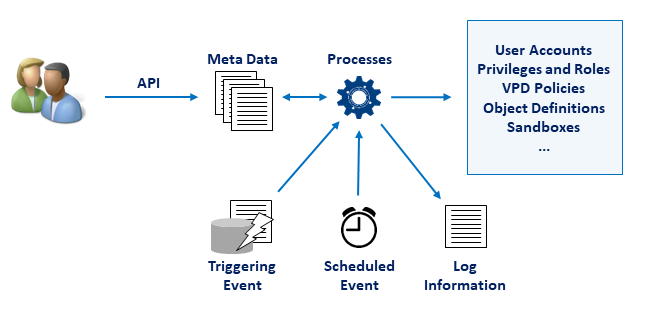
Fig. 3.2 Processing cycle of an API-call
A concrete example to illustrate the above:
A user wishes to create a new rule to discover sensitive columns in the database. To do so, procedure p_rep_designer.add_scol_discover_rule is called by the user, supplying the search patterns that should be used to look for columns. The procedure stores the request in table REP_SCOL_DISCOVER_RULES and adds a log record to table LOG_MESSAGES. A few seconds later a repeating SCURTY job calls a procedure that picks up this new information and processes it. Finally all column names that meet the search conditions are inserted into table REP_SENSITIVE_COLUMNS and several log records are written to table LOG_MESSAGES.
The information about sensitive columns in the SCURTY repository will be used when a user is granted access on an object group (OG) or on tenants (TNT) using procedures p_rep_oper.grant_user_og_access or p_rep_oper.grant_user_tnt_access.
The previous example is illustrated by the following figure:
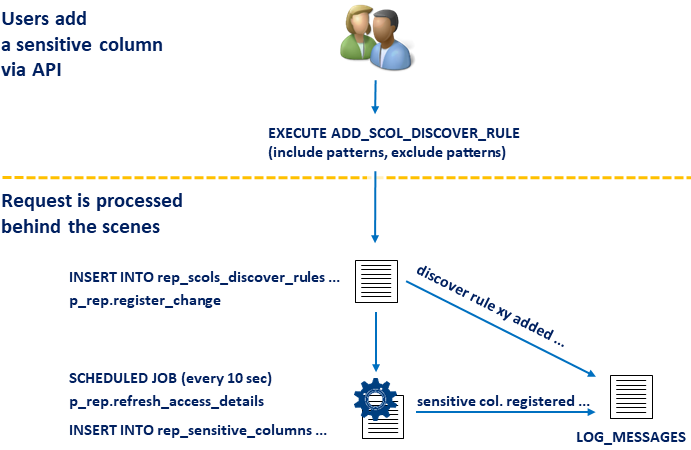
Fig. 3.3 An API-call processing example
3.6. Separation of duties
After the initial setup no DBA is needed to administer SCURTY. Five different roles enable strict separation of duties inside SCURTY. An administrative user can hold one to all of these roles which means that separation may be enforced more or less strict.
The table below shows the list of administrative roles, their corresponding database roles and the PL/SQL packages (“main API”) granted to those roles:
role |
database role |
main API |
|---|---|---|
Admin |
R_SCURTY_ADMIN |
P_REP_ADMIN |
Designer |
R_SCURTY_DESIGN |
P_REP_DESIGNER |
Operator |
R_SCURTY_OPER |
P_REP_OPER |
Monitoring |
R_SCURTY_MONITOR |
Tables and Views |
Sandbox Admin |
R_SCURTY_SANDBOX_ADM |
P_SBX_ADMIN |
The roles get granted through procedure p_rep_admin.grant_admin_role.
3.6.1. Description of administrative roles
The following paragraphs provide an overview about the responsibilities of the different administrative roles:
Admin role
Initial setup of SCURTY like granting other admin users or providing tablespaces and user profiles (see below).
System administration: enable or disable SCURTY, start and stop all jobs schedules and other system wide tasks.
Environment administration: provide tablespaces, user profiles and custom database roles for use with SCURTY. (Custom database roles are roles outside of SCURTY.) Set system wide parameters like the email-server for notification messages.
User administration: grant user roles (HU, GU, TU) and admin types (ADM, DES, OPR, MON, SBX).
Tenant and object group administration: create or modify discover rules to identify tables and views to be included in automatically created object groups. These object groups are automatically named by the system, all names start with “U$”. Create or modify discover rules to identify tenant columns. (Data of tenant columns is used to restrict access on row level.)
Performance tasks: exempt objects from triggering immediate SCURTY refreshes, change hints for internal views and enable or disable the use of Oracle Partitioning Option. Designer role
Object group definitions: create or modify object groups. Add or remove objects to or from object groups by either naming objects or by creating rules to discover objects through search patterns. The designer role enables to create object groups by explicitly providing a name for the group. In a second step objects are added to the group. In contrast, object group creation by users holding the admin role is only one step (creating an object group discover rule) and the object group gets named automatically.
Sensitive column definitions: register a column as sensitive to enable access restrictions on these columns. This definition can be done by either naming the columns or by creating discover rules to identify the column names through search patterns.
Column level tenant mode (CLT) definitions: register columns to enable column level tenant mode for a tenant groups.
Operator role
User provisioning: create, alter or drop database users and reset their passwords.
User access provisioning: grant or revoke the following privileges:
custom database roles
the “connect through” privilege (proxy user authentication)
exemption of fine grained access control
access to sandboxes
access to object groups
access to tenants
Force a SCURTY refresh of system definitions outside the normal schedule.
Monitoring role
Monitor SCURTY system status by using the provided tables and views
Sandbox admin role
All sandbox administrative work like:
Provide tablespaces for use with sandboxes
Create or modify sandboxes
Grant user or master access to sandboxes
Grant access on sandbox tenants